 Q Labs MSP Automation
Introduction: From Reactive to Strategic
Attention, MSP operatives! If you’re managing more endpoints than Bond has gadgets, and your techs are drowning in a sea of tickets, this intelligence briefing is for you.
The difference between struggling MSPs and thriving ones often comes down to one thing: standardized procedures that transform chaos into clockwork operations. This isn’t just about documentation—it’s about building the systems that let you scale without losing your sanity.
Remember, it’s called Managed Service Provider for a reason. Without proper SOPs, you’re just a reactive repair shop with a fancy name. True management requires systematic approaches that create predictable outcomes.
As your trusted Q Branch, we’ve identified the five most critical Standard Operating Procedures (SOPs) that will elevate your MSP from a reactive repair shop to a proactive powerhouse. These aren’t just any SOPs—they’re the secret weapons that will help you scale efficiently while maintaining service quality.
The Complete Lifecycle: How Everything Connects
Before diving into the individual SOPs, it’s crucial to understand how they fit together in the complete user and workstation lifecycle:
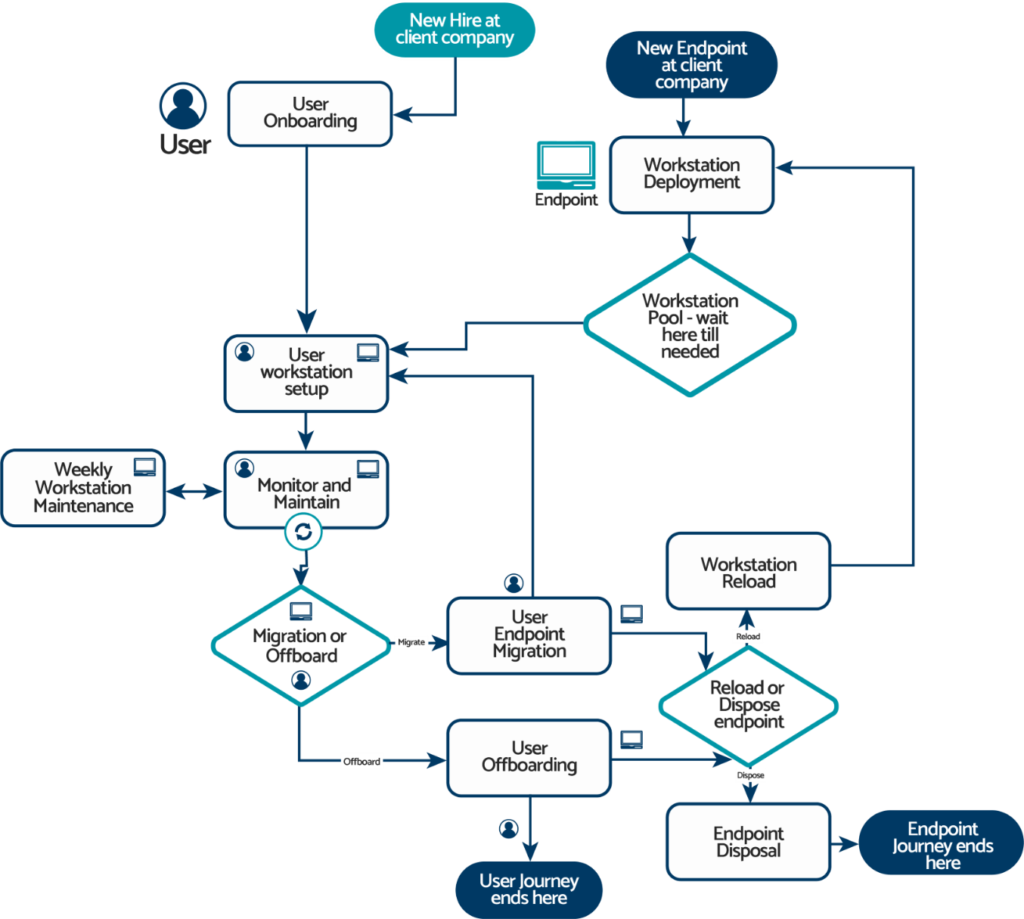
This flowchart illustrates the complete lifecycle of users and workstations in your MSP practice. Note how each process feeds into the next, creating a continuous cycle of management.
As you can see, a strong workstation deployment process directly impacts your ability to efficiently reload workstations when users leave. Similarly, proper offboarding procedures ensure workstations can be quickly prepared for new users without remnants of previous configurations or data that create security risks and support headaches.
Each of these processes represents an opportunity to demonstrate the true value of your managed services. Let’s examine the five most critical SOPs that form the backbone of this lifecycle.
Why These 5 SOPs?
We’ve identified these specific procedures because they:
- Address the most time-consuming processes in the endpoint lifecycle
- Eliminate the most common sources of human error
- Create the greatest impact on service consistency
- Reduce unnecessary emergency response situations
- Build the foundation for your operational maturity evolution
Ready to upgrade your arsenal? Let’s dive in.
SOP #1: New Workstation Deployment Protocol
The Problem: Without a standardized deployment process, your techs waste time reinventing the wheel with each new device, creating inconsistent setups that lead to support headaches later.
The Solution: A comprehensive workstation deployment SOP that covers everything from unboxing to handoff.
Key Components:
- Pre-Deployment Checklist: Hardware verification, asset tagging, and inventory documentation
- Base Image Configuration: Standardized OS installation with required security settings
- Global Software Deployment: RMM agent, antivirus, and standard applications installed on ALL client machines
- Client-Specific Configuration: Custom software, network settings, and security policies based on client requirements
- Quality Assurance Testing: Verification procedures to ensure everything works before deployment
- Documentation Requirements: Asset information updates in your PSA and documentation system
Best Practices:
- Create a detailed checklist for each deployment phase to ensure consistency
- Establish clear separation between global settings (for all clients) and client-specific configurations
- Develop a standardized naming convention for all deployed assets
Lifecycle Connection: This SOP forms the foundation of your entire endpoint management process. A well-deployed workstation requires fewer support tickets throughout its lifecycle and is much easier to reload for a new user when the time comes.
Scaling Impact: Reduces device setup time by up to 70% and eliminates configuration inconsistencies that generate support tickets.
SOP #2: User Onboarding & Offboarding Process
The Problem: Incomplete user onboarding leads to productivity loss and security risks, while poor offboarding creates security vulnerabilities and compliance issues.
The Solution: A detailed SOP covering the complete employee lifecycle from hiring to departure.
Key Components:
- Account Provisioning Workflow: Email, network access, application accounts, and hardware assignment
- Security Orientation: Initial training touchpoints and security awareness materials
- Role-Based Access Templates: Predefined access levels based on job functions
- Offboarding Checklist: Account deactivation, data transfer, and security revocation steps
- Exit Documentation: Asset recovery tracking and access termination verification
- Legal Compliance Requirements: Documentation retention policies by client/industry
Best Practices:
- Create standardized forms for clients to request new user setups or departures
- Develop client-specific variations of the base process to accommodate unique requirements
- Establish verification steps to confirm all accounts are properly provisioned or deprovisioned
Lifecycle Connection: This SOP directly feeds into your workstation deployment (for new users) and reload processes (for departing users), ensuring smooth transitions at every stage of the employee lifecycle.
Scaling Impact: Reduces onboarding time by 50%, eliminates security gaps during transitions, and prevents the “ghost user” problem that plagues growing organizations.
SOP #3: Proactive Maintenance Framework
The Problem: Reactive break-fix models consume technician time, create unpredictable workloads, and decrease client satisfaction.
The Solution: A structured approach to predictive and preventative maintenance that catches issues before they affect productivity.
Key Components:
- Weekly Automated Health Checks: Disk space, system performance, security status, and backup verification
- Monthly Maintenance Schedule: Standardized tasks for keeping systems optimized
- Alert Threshold Configuration: Early warning system for potential issues
- Common Issue Prevention: Proactive steps to address frequently occurring problems
- Compliance Verification: Regular checks for security and regulatory requirements
- Performance Trending: Identification of systems that need replacement or upgrades
Best Practices:
- Develop a calendar-based schedule that distributes maintenance evenly throughout the month
- Create client-facing reports that demonstrate the value of proactive maintenance
- Establish clear criteria for when an issue requires immediate attention vs. scheduled maintenance
Lifecycle Connection: This SOP extends the useful life of workstations by preventing premature hardware failures and maintaining optimal performance throughout their lifecycle.
Scaling Impact: Reduces emergency tickets by up to 40% and transforms maintenance from a cost center to a client value demonstration.
SOP #4: Endpoint Migration & Refresh Process
The Problem: Disorganized migrations lead to data loss, extended downtime, and frustrated clients who question your competence.
The Solution: A structured approach to data migration and hardware refreshes that ensures smooth transitions with minimal disruption.
Key Components:
- Pre-Migration Assessment: User requirement analysis and data inventory
- Migration Planning Template: Timeline, responsibilities, and communication plan
- Data Transfer Protocol: Standardized processes for user profile and data migration
- Post-Migration Verification: Testing procedures to ensure complete transfer
- User Orientation Checklist: Steps to familiarize users with new systems
- Legacy Equipment Handling: Secure data wiping and disposition procedures
Best Practices:
- Create a schedule that minimizes downtime during work hours
- Develop internal checklists for each phase of the migration
- Establish a data verification process that confirms all needed files are transferred
Lifecycle Connection: This SOP sits at the critical phase of the workstation lifecycle where it’s time to upgrade a user’s device, providing a seamless transition without disrupting productivity.
Scaling Impact: Reduces migration time by 30% and virtually eliminates data loss incidents during transitions.
SOP #5: Workstation Reload Protocol
The Problem: Without a standardized reload process, decommissioned workstations often sit unused or get redeployed with remnants of previous configurations, creating security risks and inefficiencies.
The Solution: A systematic approach to wiping, refurbishing, and redeploying workstations when users leave or change roles.
Key Components:
- Data Migration Procedure: Steps to securely transfer user data to appropriate storage or new owner
- Secure Wiping Protocol: Standardized methods for completely removing previous user data
- Hardware Assessment Checklist: Criteria for determining if a workstation should be redeployed or retired
- Refurbishment Process: Steps for physical cleaning and component testing
- Redeployment Preparation: Reapplying your standard deployment image and configurations
- Inventory Status Update: Procedures for updating asset status in your management systems
Best Practices:
- Create a decision matrix to quickly determine if a workstation should be redeployed or retired
- Establish clear criteria for what constitutes a “reusable” device
- Develop a tracking system for refurbished devices to monitor their performance after redeployment
Lifecycle Connection: This SOP creates a circular economy within your clients’ organizations, maximizing the value of hardware investments and ensuring that redeployed workstations are as reliable as new ones.
Scaling Impact: Reduces hardware expenditures by up to 30% through effective reuse and eliminates the security risks of improperly redeployed devices.
Implementing Your SOP Strategy
Creating these five SOPs won’t happen overnight, but here’s your roadmap to implementation:
- Start With Templates: Don’t reinvent the wheel—leverage existing frameworks and customize them to your needs.
- Prioritize Based on Pain: Begin with the SOP that addresses your biggest current challenge.
- Involve Your Team: Technicians who help create procedures are more likely to follow them.
- Test Before Scaling: Pilot each SOP with a small client group before rolling out broadly.
- Schedule Regular Reviews: Set calendar reminders to update SOPs as technologies and best practices evolve.
Putting the “Managed” Back in MSP
True MSPs don’t just react to problems—they prevent them through systematic management. These SOPs transform your service delivery from “we’ll fix it when it breaks” to “we’ll ensure it rarely breaks, and when it does, we’ll resolve it efficiently.”
This level of service maturity doesn’t just scale better—it commands higher margins and creates stickier client relationships. After all, any break-fix shop can repair a computer, but only a mature MSP can manage a fleet of devices through their entire lifecycle with predictable outcomes and minimal disruptions.
Remember: Your clients aren’t paying you to fix computers; they’re paying you to manage their technology so they can focus on their business. These SOPs are the foundation of delivering on that promise.
Measuring Success
How will you know if your SOPs are working? Track these key metrics:
- Time Savings: Compare process completion times before and after implementation
- Error Reduction: Monitor incidents caused by missed steps or inconsistent execution
- Client Satisfaction: Watch for improvements in feedback and reduced complaints
- Team Adoption: Measure how consistently your team follows the new procedures
- Financial Impact: Calculate cost savings from reduced labor and fewer emergencies
Your Next Mission
Ready to transform your MSP operations from chaotic to clockwork? Your mission, should you choose to accept it:
- Download our free “MSP SOP Template Bundle,” including:
- The full-resolution User & Workstation Lifecycle Flowchart
- Editable templates for all five critical SOPs
- Implementation checklists to get started
- Schedule a no-obligation “SOP Strategy Session” with our team to identify your biggest operational bottlenecks
- Watch our on-demand webinar: “Conquering the Chaos – Workstation Deployments for MSPs“ where we dive deep into creating efficient deployment processes that save time and reduce errors
- Join our upcoming webinar: “From Reactive to Strategic: Building SOPs That Put the ‘Managed’ in MSP”
Don’t let operational chaos be your MSP’s villain. With these five critical SOPs, you’ll be equipped with the secret weapons you need to scale efficiently, serve clients consistently, and build an MSP that runs like a well-oiled machine.
Your clients don’t just need IT support—they need IT management. These SOPs are how you deliver on that promise.
Ready for your next mission briefing? Contact Q Labs today to receive your free SOP Template Bundle.
Note: For MSPs looking to take their automation to the next level, Q Labs offers premium access to our Cleared Access program with advanced automation scripts and personalized implementation guidance. Ask us how during your strategy session.
© Q Labs 2025 – Your MSP’s Secret Weapon for Scaling Success