 Q Labs MSP Automation
Companion to “The Blind Spot in Your Endpoint Security Is Sitting in the Browser.” That post covers why. This one covers how.
This is written for the technical person at an MSP who was handed the public post and told “see if we can do this.” It assumes Rewst, a Datto RMM-style RMM that can run PowerShell as SYSTEM and expose site variables, and IT Glue as the documentation platform. If your stack differs, the shape still holds; the specifics will need translating.
We’re not publishing the component or the workflow exports. There’s enough here to rebuild it, and we’ve been honest about the rough edges so you don’t have to rediscover them. If you’d rather have it running than build it, that’s what we do — the offer is at the bottom.
Architecture
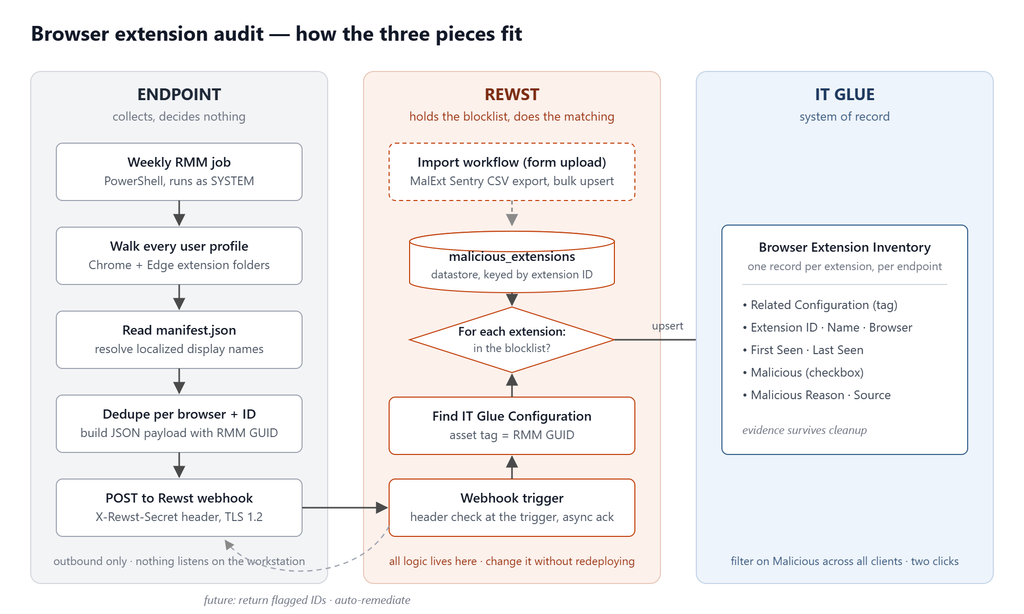
Three moving parts, each with one job.
The endpoint collects. A PowerShell component runs weekly through the RMM, walks every user profile, reads Chrome and Edge extensions, and POSTs a JSON payload to a Rewst webhook. It makes no decisions.
Rewst decides. The MalExt Sentry blocklist lives in Rewst’s native datastore. One workflow imports it from a CSV. A second workflow receives each endpoint’s payload, checks every extension against the blocklist, and writes results to IT Glue.
IT Glue remembers. Every extension on every endpoint becomes a Flexible Asset record tagged to that endpoint’s Configuration, with first-seen and last-seen dates and a malicious flag with the reason and source from the blocklist.
Keeping the endpoint dumb is deliberate. All the logic sits in Rewst, where it can be changed without redeploying anything to a thousand machines.
Part 1: The endpoint component
Where extensions live
Chrome and Edge store extensions per user profile, not per machine. Running as SYSTEM, the component walks every user directory:
C:\Users\<user>\AppData\Local\Google\Chrome\User Data\<Profile>\Extensions\<id>\<version>\manifest.json
C:\Users\<user>\AppData\Local\Microsoft\Edge\User Data\<Profile>\Extensions\<id>\<version>\manifest.json
Details that matter:
<Profile>isDefaultfor the first profile, thenProfile 1,Profile 2, and so on. Users signed into multiple Google accounts will have several.<id>is the 32-character extension ID, always lowercaseathroughp. Filtering folders on^[a-p]{32}$skips everything that isn’t an extension.<version>folder names look like1.65.0_0. They don’t sort semantically as strings, so pick the newest by last write time, not by name.- Skip
Public,Default,Default User, andAll UsersunderC:\Users.
powershell$browserPaths = @{
chrome = 'AppData\Local\Google\Chrome\User Data'
edge = 'AppData\Local\Microsoft\Edge\User Data'
}
$skipUsers = @('Public', 'Default', 'Default User', 'All Users')
$userDirs = Get-ChildItem (Join-Path $env:SystemDrive 'Users') -Directory -ErrorAction SilentlyContinue |
Where-Object { $skipUsers -notcontains $_.Name }
# ...per user, per browser, per profile:
$idDirs = Get-ChildItem $extRoot -Directory -ErrorAction SilentlyContinue |
Where-Object { $_.Name -match '^[a-p]{32}$' }
foreach ($idDir in $idDirs) {
$versionDir = Get-ChildItem $idDir.FullName -Directory -ErrorAction SilentlyContinue |
Sort-Object LastWriteTime -Descending | Select-Object -First 1
# read manifest.json from $versionDir
}Resolving the display name
This is the part most quick scripts get wrong. Open a manifest.json for a store extension and the name field usually reads "name": "__MSG_appName__". That’s a localization placeholder. The real string is in _locales\<locale>\messages.json, keyed by whatever sits between __MSG_ and __. The manifest’s default_locale tells you which folder to look in, with en as a reasonable fallback.
powershell
function Resolve-ExtensionName {
    param([string]$RawName, [string]$VersionDir, [string]$DefaultLocale)
    if ([string]::IsNullOrWhiteSpace($RawName)) { return 'Unknown' }
    if ($RawName -notmatch '^__MSG_(.+)__$') { return $RawName }

    $msgKey = $Matches[1]
    $localeCandidates = @($DefaultLocale, 'en', 'en_US', 'en_GB') | Where-Object { $_ } | Select-Object -Unique
    foreach ($locale in $localeCandidates) {
        $messagesPath = Join-Path $VersionDir "_locales\$locale\messages.json"
        if (-not (Test-Path $messagesPath)) { continue }
        try {
            $messages = Get-Content $messagesPath -Raw -Encoding UTF8 | ConvertFrom-Json
            $entry = $messages.PSObject.Properties | Where-Object { $_.Name -ieq $msgKey } | Select-Object -First 1
            if ($entry -and $entry.Value.message) { return $entry.Value.message }
        }
        catch { }
    }
    return $RawName
}
The case-insensitive match on the key (-ieq) is intentional. Chrome treats message keys case-insensitively, and some developers don’t keep them consistent between the manifest and the messages file.
Identifying the endpoint
Datto RMM writes the device’s identifier to HKLM:\SOFTWARE\CentraStage\DeviceID. That same GUID is what Datto’s IT Glue integration puts in the Configuration’s Asset Tag field. That’s the entire matching strategy: read the GUID from the registry, send it with the payload, and on the Rewst side look up the Configuration whose asset tag equals it. No hostname matching, no serial numbers, nothing that drifts.
powershell
$rmmGuid = (Get-ItemProperty -Path 'HKLM:\SOFTWARE\CentraStage' -ErrorAction SilentlyContinue).DeviceIDIf the GUID can’t be read, the component exits with an error rather than sending an unidentifiable report. On a different RMM, find the equivalent: whatever unique identifier your RMM-to-IT Glue sync writes into the Configuration record.
The payload
The component collects one entry per (user, profile, browser, extension) for logging, then dedupes to one entry per (browser, extension ID) for the payload. The same extension in two users’ profiles is one entry.
json
{
  "rmm_guid": "94152d66-4b58-4497-90b3-1bb1fc02b787",
  "extensions": [
    { "extension_id": "cjpalhdlnbpafiamejdnhcphjbkeiagm", "extension_name": "uBlock Origin", "browser": "edge" },
    { "extension_id": "ghbmnnjooekpmoecnnnilnnbdlolhkhi", "extension_name": "Google Docs Offline", "browser": "chrome" }
  ]
}
An endpoint with no extensions still sends an empty array. “This machine reported nothing” is different from “this machine never reported,” and we want IT Glue to reflect the real state.
This payload shape is ours. It isn’t a MalExt Sentry format or any kind of standard, so if you build your own Rewst side, you get to define it however you like.
Sending it
powershell
[Net.ServicePointManager]::SecurityProtocol = [Net.SecurityProtocolType]::Tls12

$payloadJson  = ConvertTo-Json -InputObject $payload -Depth 5 -Compress
$payloadBytes = [System.Text.Encoding]::UTF8.GetBytes($payloadJson)
$webhookHeaders = @{ 'X-Rewst-Secret' = $webhookSecret }

$webhookResponse = Invoke-RestMethod -Uri $webhookUrl -Method Post -Headers $webhookHeaders `
    -Body $payloadBytes -ContentType 'application/json; charset=utf-8' -TimeoutSec 30
Two things here aren’t decoration. Forcing TLS 1.2 is mandatory under SYSTEM on older Windows builds, where default protocol negotiation can fail silently against modern endpoints. And sending the body as UTF-8 bytes rather than a string matters because extension names can contain non-ASCII characters, and Invoke-RestMethod will mangle them if you hand it a plain string.
The component also logs the exact JSON it sent (truncated at 4,000 characters) to the Windows event log, so you can verify the payload shape from the endpoint side without touching Rewst.
Securing the webhook
The Rewst webhook URL itself isn’t a secret, but every call carries an X-Rewst-Secret header. The secret and the URL are both stored as RMM site variables and read from environment variables at runtime, so neither is in the script body, the component library, or a Git repo.
powershell
$webhookUrl    = $env:Q_AuditBrowserPlugin_URL
$webhookSecret = $env:Q_AuditBrowserPlugin_Token
The component fails closed: if either variable is missing, it exits with an error before touching anything. Traffic is outbound-only from the endpoint. Nothing listens on the workstation.
The remediation switch
The component reads a third variable, AutoRemediate, parses it as a boolean, and logs it. In the current version it does nothing else. The switch is there so the removal path can be added without changing the job’s configuration later. See “Known gaps” for why remediation needs a Rewst-side change first.
Running it
Our version uses Write-DRMMLog, a helper from our launcher framework that writes to both the console and the Windows event log. Outside our framework, replace those calls with Write-Host and it runs as-is on standard PowerShell 5.1. One caveat: our copy is code-signed, so editing it invalidates the signature. That only matters if your execution policy is AllSigned.
Schedule it as a weekly RMM job against all Windows workstations. Ours runs alongside the standard weekly audit job.
Part 2: The Rewst side
The blocklist in the datastore
The blocklist lives in Rewst’s native datastore as a records collection named malicious_extensions. It’s a schemaless JSON document store, not a fixed-column table, which turned out to be exactly right: we store each MalExt Sentry CSV row whole and only index what we query.
- Record key: the extension ID, lowercased. This is what the intake workflow looks up.
- Data: the entire parsed CSV row, unmodified —
extension_id,name,reason,source,date,blocklist,store,version,sha256. - Indexed fields:
storeandblocklist.
Nothing is dropped on the way in. Only three fields ever leave the datastore for IT Glue: extension_id, reason, and source. Everything else stays in Rewst for future use.
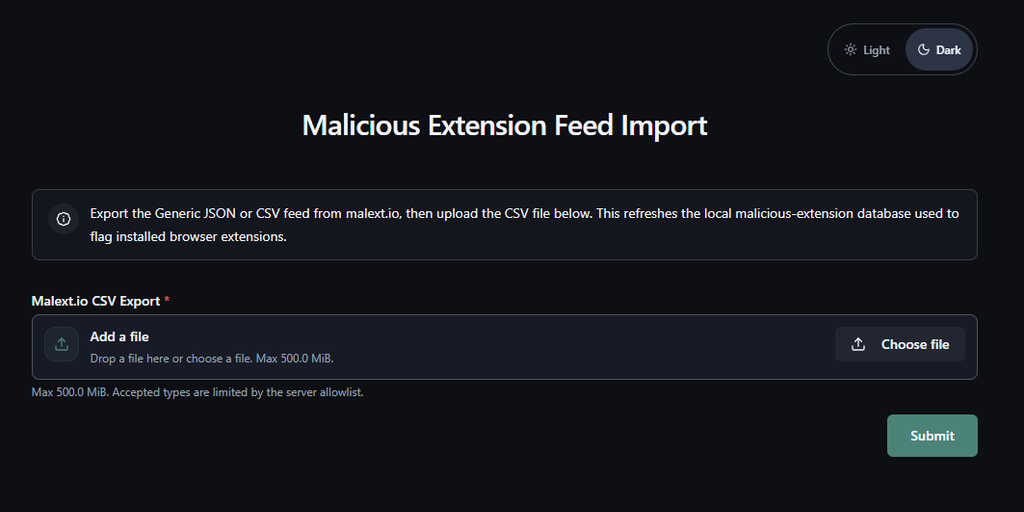
The import workflow
We’ll be honest about this one, because the obvious design and the one we shipped are different.
The obvious design is a scheduled pull from the MalExt Sentry export URL. What we built is a manual import: export a CSV from malext.io, upload it through a Rewst form, and the workflow does the rest. The malext.io database page has an Export CSV button that respects whatever filters you’ve set, so the weekly routine is “filter to the last week, export, upload.” It takes about a minute. Automating the fetch is on the list, and the raw CSV is published on GitHub, so it’s a small workflow to write. We just haven’t yet.
The workflow, Malicious Extension Feed Import, in canvas order:
- Receive Form (form trigger) — the form has one field, a CSV upload.
- Read File — reads the upload as base64.
- Decode Data — base64 to UTF-8 text.
- Parse CSV — text to an array of row objects.
- Map to Datastore Items — builds
{ recordKey: lower(extension_id), data: <row> }per row. - Batch Into Chunks — 500 per batch, under the bulk upsert API’s 1,000-item cap.
- Loop Batches
- Upsert Malicious Extensions (datastore bulk upsert) — each batch.
- Record Last Import Time — writes the run URL to an org variable so you can see when the list was last refreshed.
The upsert matches on record key and overwrites the whole data object for that key. It never deletes. If an entry disappears from a later export, it stays in the collection until someone removes it by hand. Since MalExt Sentry entries are rarely retracted, we’re comfortable with that for now.
The webhook trigger
Authentication is a trigger-level setting, not a node in the canvas. The trigger requires the X-Rewst-Secret header with a matching value, and Rewst rejects any request that fails before a workflow run is even created. There’s no “check the header, then stop” logic to maintain.
The trigger uses Rewst’s default async response. The endpoint gets an immediate acceptance envelope and the workflow runs after. The component doesn’t wait for results and doesn’t learn whether anything matched. That’s the right behavior for a fire-and-forget RMM job, and it’s the wrong behavior for auto-remediation — more on that below.
The intake workflow
Endpoint Browser Extension Intake, sixteen nodes, in canvas order:
- Receive Webhook
- List Configurations (IT Glue
GET /configurations) — filtered onfilter[asset_tag]equal to the payload’srmm_guid. - If/Else: found? — length of results greater than zero.
- No match → write the unmatched GUID to an org variable and end. No IT Glue writes.
- Match → capture the Configuration ID and Organization ID into context.
- Get Current Time — one timestamp for the whole run.
- Loop Extensions — sequential, concurrency 1, over the payload’s
extensionsarray. Per iteration: 6. Capture extension — ID, name, browser. 7. Get Record (datastore) — look upmalicious_extensionsby the lowercased extension ID. 8. Evaluate — setsis_malicious,reason,sourcefrom the record, or false and empty if none. 9. List Flexible Assets (IT GlueGET /flexible_assets) — all assets of the Browser Extension Inventory type for this organization. 10. Filter matching asset — client-side filter on extension ID and related Configuration. 11. If/Else: exists? → Update Flexible Asset (PATCH) or Create Flexible Asset (POST). - Record processed — org variable, once, after the loop.
Step 9 deserves a note. IT Glue’s API doesn’t filter Flexible Assets by trait value, so every iteration pulls the organization’s full list of this asset type and filters it in Rewst. That works, and it’s the part most likely to hurt at scale. See “Known gaps.”

Part 3: The IT Glue Flexible Asset
The asset type is named Browser Extension Inventory. Fields:
| Field | Key | Type | Notes |
|---|---|---|---|
| Related Configuration | related-configuration | Tag (Configurations) | Ties the record to the endpoint |
| Extension ID | extension-id | Text | Required |
| Extension Name | extension-name | Text | Used for title |
| Browser | browser | Text | Free text: chrome, edge |
| First Seen | first-seen | Date | |
| Last Seen | last-seen | Date | |
| Malicious | malicious | Checkbox | |
| Malicious Reason | malicious-reason | Text | Copied from the blocklist |
| Malicious Source | malicious-source | Text | Copied from the blocklist |
Matching an existing record uses Configuration plus Extension ID. Browser is not part of the key. If the same extension ID were reported under a different browser for the same endpoint, the existing record would be updated (and its browser overwritten) rather than a second one created. That’s a deliberate simplification; it hasn’t bitten us, but it’s worth knowing.
First seen and last seen: on create, both are set to the run time. On update, first-seen is read from the existing record and resent unchanged, and last-seen is set to the run time. We resend the full trait set on every PATCH rather than relying on partial-merge behavior, and verified it live.
On a blocklist match, all three malicious fields are written: the checkbox, the reason, and the source, verbatim from the datastore record. The blocklist’s date isn’t written; there’s no field for it yet.
[SCREENSHOT: Browser Extension Inventory flexible asset with records]
In IT Glue, filtering the asset type across all organizations on Malicious = true is the fleet-wide answer to “do we have a problem.” From there it’s a ticket, a QBR line, or a conversation, depending on the client.
What it looks like in practice
On our first fleet run: nothing malicious. What it did surface was McAfee WebAdvisor on a couple of machines, bundled in with something else and never chosen by anyone. The tool was built to catch attackers; its first real finding was junkware. We’ll take both.
Performance, measured on live runs: roughly two seconds per extension, sequential. An endpoint with 3 extensions finished in about 6 seconds, 8 extensions in about 15, 16 extensions in about 33. Most of that is step 9’s full asset re-query. The RMM fired the job across the fleet nearly simultaneously and each endpoint ran as an independent workflow run; across 47 runs we saw no IT Glue rate-limit errors. That was one small fleet over a few minutes, not a stress test.
Known gaps
We’d rather you hear these from us.
- The full asset re-query in step 9 scales with extensions per endpoint times total assets in the organization. It’s the first thing to redesign for a large fleet — pull the org’s asset list once per run and filter in memory across the loop.
- Duplicate asset tags. The intake workflow checks for at least one Configuration match and uses the first. If IT Glue ever returned two Configurations with the same asset tag, the second would be silently ignored.
- Browser isn’t in the match key (see Part 3).
- Disappearance is passive. When an extension is removed, it simply stops being reported and last-seen stops advancing. There’s no staleness flag or auto-archive after N days.
- No failure branches on the IT Glue nodes. If IT Glue is unreachable mid-run, the run aborts at that node. Extensions already written stay written; the rest of that endpoint’s list is skipped until the next weekly run. No retry, no dead-letter queue.
- Import is manual and never prunes.
- Firefox is out of scope. It uses a different add-on ID scheme, so nothing from a Chrome/Edge-store blocklist will ever match. Other Chromium browsers (Brave, Vivaldi) aren’t excluded architecturally — the match is a pure ID lookup — but the component only walks Chrome and Edge profile paths today.
What’s next
Auto-remediation. The component’s switch exists, but the webhook is async, so the endpoint never learns what matched. Closing the loop means switching the trigger to a synchronous response with an output object listing flagged IDs, then having the component remove them when the switch is on. That’s a Rewst-side change first, then a small component change.
An “unwanted” list. MalExt Sentry tells us what’s malicious. It doesn’t tell us what we simply don’t want, like WebAdvisor. Adding our own entries to the datastore, flagged as unwanted rather than malicious, lets the same mechanism clean those up too. Nothing for this exists yet, in the datastore, the asset type, or the form.
Automate the import from the published CSV, and add staleness handling so records that haven’t been seen in a set number of days get flagged or archived.
The blocklist that makes this work is the MalExt Sentry project by toborrm9, open source on GitHub. We’re grateful it exists, and if you use it, consider contributing back.
If you’ve read this far and would rather have it running in your tenant than build it, that’s a conversation we’d like to have.