Q Labs MSP Automation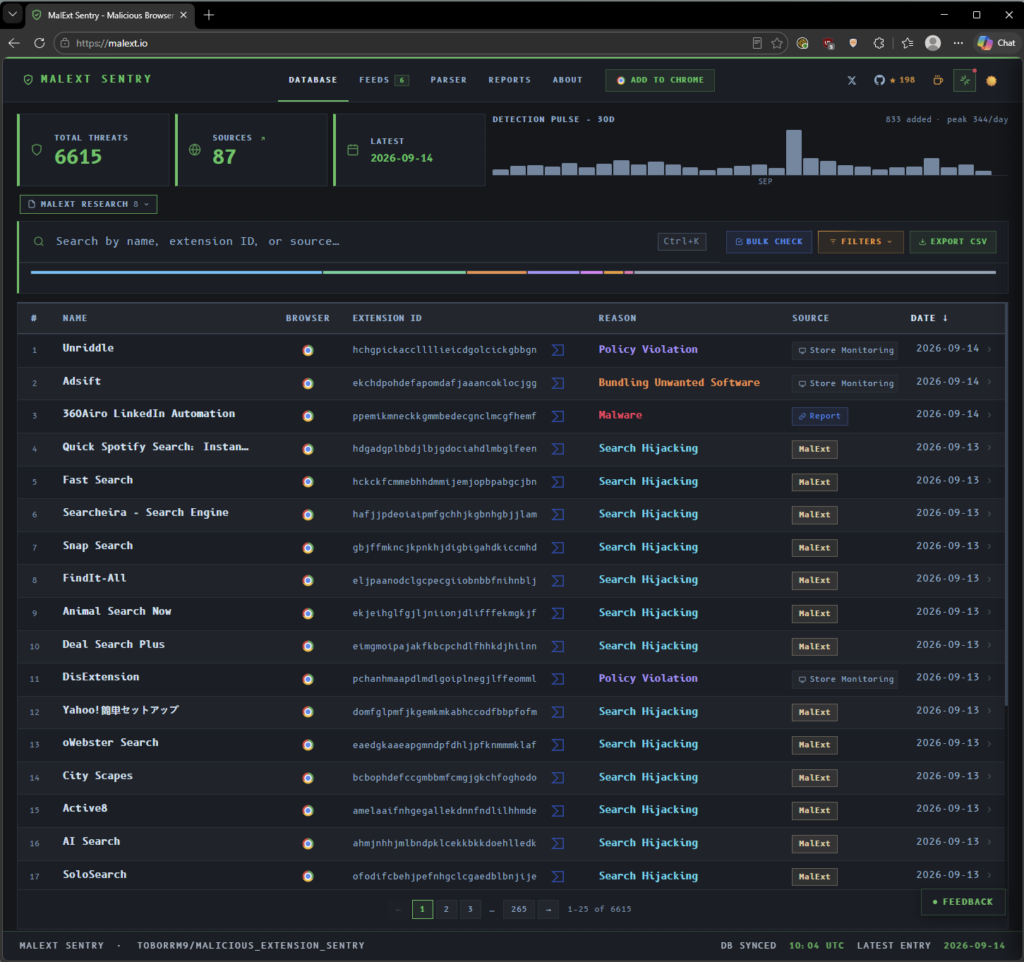
How an open-source project turned a nagging question into a weekly fleet audit.
Here’s a question worth asking about your MSP: what browser extensions are installed across every workstation you manage?
If the honest answer is “I don’t know,” you’re in good company. We couldn’t answer it either, not for one client, let alone all of them. It wasn’t a crisis. It was one of those things that nags at you once you notice it, because in hindsight it’s obvious that it matters.
Why extensions are worth caring about
An extension lives inside the one application every user has open all day. It can read the pages they visit, watch the forms they fill out, and inject its own code into any site. That’s what makes extensions useful, and it’s what makes them attractive to attackers. Legitimate extensions get sold to new owners who push a bad update. Popular ones get their developer accounts phished, and a poisoned version ships to every install overnight. Nobody clicks anything. It just updates.
We’re not going to tell you this is the biggest risk on your endpoints. It isn’t. But it’s a real one, and the uncomfortable part is that none of the standard tooling sees it. RMM software inventory reports what’s in Programs and Features, and extensions aren’t there. EDR watches processes and behavior, but an extension runs inside the browser’s process with the browser’s permissions. You can lock browsers down with an allowlist policy, and if you’ve ever told a law firm they can no longer install their own tools, you know how that conversation goes.
So most MSPs land where we did: no policy, no inventory, no visibility. Not by decision. By default.
The project that turned a worry into a build
What changed things for us was finding MalExt Sentry, an open-source project by toborrm9. It’s a curated database of known malicious and policy-violating browser extensions, and it’s built the way you’d want threat intelligence built. Entries aren’t scraped or auto-generated. Each one is sourced from security researchers or official policy-violation reports, and each one carries context: the extension ID, why it was flagged, who reported it, and when. The database updates continuously, and it publishes machine-readable exports in several formats, so you can consume it with tooling rather than reading it like a blog post.
It also ships a scanner for individual machines and a Chrome extension that checks your own browser on a schedule. If you’re one person protecting one computer, that’s the whole solution, and it’s free.
What it doesn’t do, and was never trying to do, is answer the question for an MSP across a thousand workstations, with results that land in your documentation. That was the gap. The hard part, knowing what’s bad, had already been done and given away. We just needed to plug it into the tools we already run.
What it’s worth to the business
Before this, “are there malicious extensions on our clients’ machines?” was a question we couldn’t answer. That has a business cost, not just a security cost.
Cyber insurance questionnaires and framework audits ask about software inventory. In CIS Controls v8 this lands on Safeguards 2.1, 2.3, and 2.4; in NIST SP 800-53 it’s CM-8 and CM-7(4). A scheduled, automated inventory compared against a known-bad list, with a documented record, is a clean answer to those questions. “We don’t inventory browser extensions” is a hole an auditor will find eventually.
It also gives you something to bring to a QBR. “We checked every workstation for known-malicious extensions this month, and here’s what we found” is a sentence that demonstrates the kind of attention clients think they’re already paying for.
And it produces evidence that survives cleanup. If a malicious extension turns up and gets removed, you want a permanent record of which endpoints had it and when it went away. That’s the difference between “we handled it” and “here’s what happened, when, and where.”
Build with what you already own
We’re sure there are commercial products that do this. We didn’t look very hard, because we already owned every piece: an RMM that can run code on every endpoint, Rewst to receive data and make decisions, and IT Glue, where information about endpoints already lives. Another product would mean another line in cost of goods sold, another vendor, and another integration to babysit.
The design is three parts, and each one does a single job.
The RMM collects. A small component runs weekly on every workstation, reads the installed Chrome and Edge extensions, and reports them. It doesn’t decide anything.
Rewst decides. Rewst’s new data tables let you store and query data inside the platform, so the MalExt Sentry list lives right next to the workflow that uses it. One workflow keeps that table current on a schedule. Another receives each endpoint’s report and checks every extension against it.
Documentation remembers. Every extension found on every endpoint becomes a record in IT Glue, tagged to that endpoint, with first-seen and last-seen dates and a flag for any blocklist match.
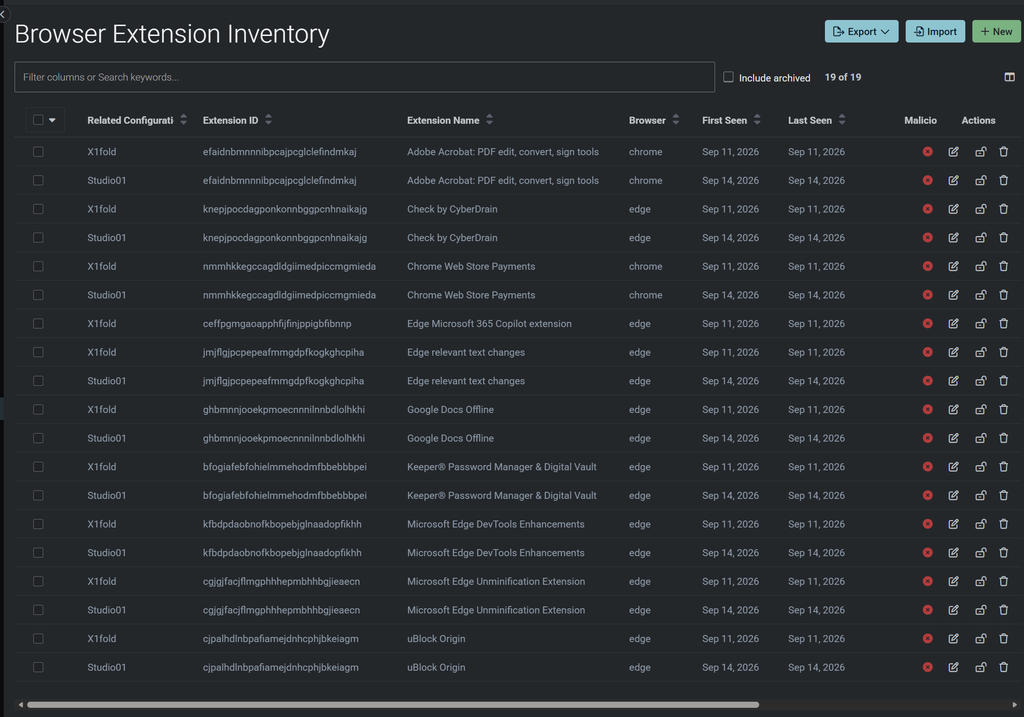
The result in IT Glue: every extension, per endpoint, with first and last seen. Filter on the malicious column across all clients and you have your answer in two clicks.
What we found
We rolled it out across our own fleet first. Nothing malicious. We run a small MSP with well-behaved clients, and the first run came back clean.
That’s the outcome you want, and it’s also a statement we couldn’t have made with any confidence a month earlier. What it did surface was McAfee WebAdvisor on a couple of machines. Not malicious, and nobody chose to install it. It rode in bundled with something else, and nothing was looking. The tool was built to catch attackers, and its first real finding was junkware. Both are things we’d rather know about.
The honest summary: we have peace of mind where before we had a shrug.
What’s next
Two things. Auto-remediation first: the component already has the switch for it, so when Rewst finds a match, it can hand the flagged IDs back and the endpoint removes them. Then an “unwanted” list alongside the malicious one, so the same mechanism cleans up the WebAdvisors of the world.
Where to go from here
If you’re on Rewst and have someone technical on staff, this is buildable. We wrote up the full walkthrough, including the payload format, how endpoints get matched to their documentation record, how the webhook is secured, and the component itself, in our resources section.
Browser Extension Audit: The Technical Walkthrough – Q Labs – Centralized Services
If you’d rather talk about what this would look like in your stack, that’s a conversation we’d like to have. It’s the kind of thing we build for the MSPs we work with, and it’s included for our Complete Suite clients.
Credit where it’s due: the blocklist that makes this work is the MalExt Sentry project by toborrm9. We built the plumbing. They built the intelligence. If you use it, consider contributing back.